The difference between an AI agent and an AI workflow is control. An AI workflow follows a defined sequence of steps, while an AI agent can make decisions about what to do next based on context, available tools, and the goal it is trying to complete.
Use an AI workflow when the path is known, repeatability matters, and the process should stay predictable. Use an AI agent when the path is uncertain, the task requires judgment, or the system needs to choose between tools, actions, or next steps.
In practice, many production AI systems are hybrid. Workflows provide structure. Agents handle uncertainty. Prompts, guardrails, tools, and human approvals keep the system manageable.
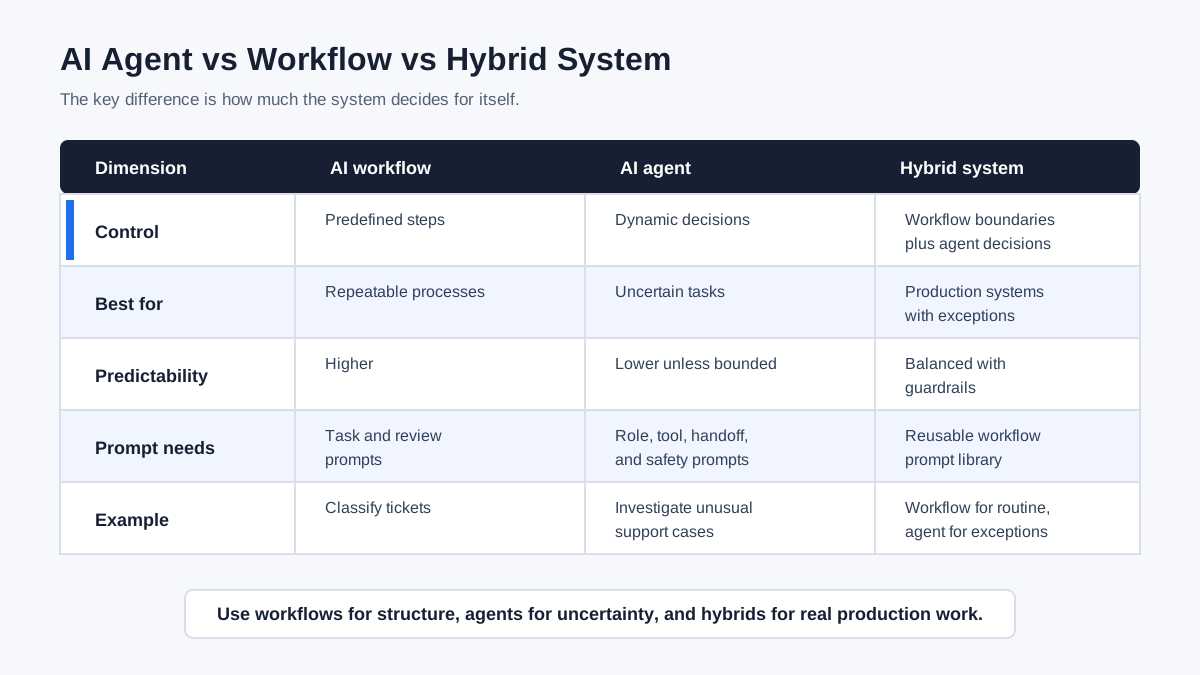
Quick Answer: AI Agent vs Workflow
An AI workflow is a structured process that uses AI inside predefined steps. An AI agent is a system that can interpret a goal, use tools, and decide what action to take next within a set of constraints.
The simplest rule is:
| Use this | When |
|---|---|
| AI workflow | The steps are known and repeatable |
| AI agent | The next step depends on context or judgment |
| Hybrid system | You need predictable structure plus adaptive decisions |
For example, a workflow can summarize every new support ticket, classify it, and send it to the right queue. An agent can investigate an unusual support case, decide which account data to inspect, ask for missing information, and escalate when confidence is low.
What Is an AI Workflow?
An AI workflow is a defined sequence of steps where AI performs one or more tasks inside a larger process. The workflow may include prompts, tools, APIs, conditions, approvals, and outputs, but the overall path is usually designed in advance.
A simple AI workflow might look like this:
- Receive a customer message.
- Classify the message by intent.
- Summarize the issue.
- Draft a reply from a template.
- Send the draft to a human for approval.
The workflow can still use LLMs. The key difference is that the LLM does not decide the entire process. It performs assigned steps inside a controlled flow.
AI workflows are useful when you want consistency, auditability, and repeatability. They are often easier to test because each step has expected inputs, outputs, and rules.
What Is an AI Agent?
An AI agent is a system that can use an AI model to pursue a goal, decide what to do next, use tools, and adapt its actions based on new information. Instead of only completing one predefined step, an agent can reason through the current state of the task and choose a next move.
An AI agent might:
- Interpret a user’s goal
- Decide which tool to call
- Search for missing information
- Ask a follow-up question
- Hand off to another agent
- Review intermediate results
- Retry a failed step
- Escalate to a human
The OpenAI Agents SDK describes agents as systems that combine instructions, tools, handoffs, guardrails, and tracing. LangGraph documentation also draws a practical distinction between workflows and agents by noting that agents have more autonomy and can decide which tools to use and how to solve problems.
The value of an agent is adaptability. The risk of an agent is that more autonomy can also mean more variability, higher cost, and harder debugging.
The Key Differences Between AI Agents and Workflows
AI agents and workflows differ most in autonomy, predictability, flexibility, observability, and risk.
| Dimension | AI workflow | AI agent |
|---|---|---|
| Control | Predefined steps | Dynamic decisions |
| Best for | Repeatable processes | Uncertain or variable tasks |
| Predictability | Higher | Lower unless constrained |
| Flexibility | Lower | Higher |
| Testing | Easier step-by-step | Harder because paths vary |
| Cost | Easier to estimate | Can grow with tool use and retries |
| Human review | Usually placed at known points | Needed when decisions become sensitive |
| Prompt needs | Task prompts and review prompts | Role prompts, tool prompts, handoff prompts, safety prompts |
Neither pattern is automatically better. The right choice depends on whether the task needs predictable execution or adaptive decision-making.
When to Use an AI Workflow
Use an AI workflow when the process is known, the steps are repeatable, and the business needs predictability more than autonomy.
AI workflows are a good fit for:
- Summarizing incoming messages
- Classifying support tickets
- Drafting standard replies
- Extracting fields from documents
- Creating recurring reports
- Routing leads by clear rules
- Running review and approval steps
- Generating content from an approved brief
Workflows are especially useful when there are compliance, quality, or operational requirements. If the process must follow the same steps every time, a workflow usually gives better control than a highly autonomous agent.
The tradeoff is brittleness. A workflow can fail when the input does not fit the expected path. If exceptions are common, you may need an agent or a human review step to handle uncertainty.
When to Use an AI Agent
Use an AI agent when the path is uncertain and the system needs to decide what to do next. Agents are most useful when the task requires interpretation, tool choice, investigation, or adaptation.
AI agents are a good fit for:
- Research tasks with unclear source paths
- Support cases that require investigation
- Coding tasks with iterative debugging
- Sales workflows that need account context
- Data analysis where the next query depends on prior results
- Multi-step planning where the user goal is clear but the path is not
- Tasks that require asking follow-up questions
Agents are powerful when the system cannot know every step in advance. But this flexibility should be bounded. A good agent still needs clear instructions, tool limits, handoff rules, review checks, and escalation criteria.
When to Combine Agents and Workflows
Many practical AI systems combine workflows and agents. The workflow defines the stable structure, and the agent handles the uncertain parts.
For example, a customer support system might use this hybrid pattern:
- A workflow receives and classifies the ticket.
- A workflow checks whether the ticket matches a known process.
- If the issue is routine, the workflow drafts a standard reply.
- If the issue is unusual, an agent investigates account history and prior tickets.
- The agent drafts a recommendation.
- A human approves sensitive replies or account changes.
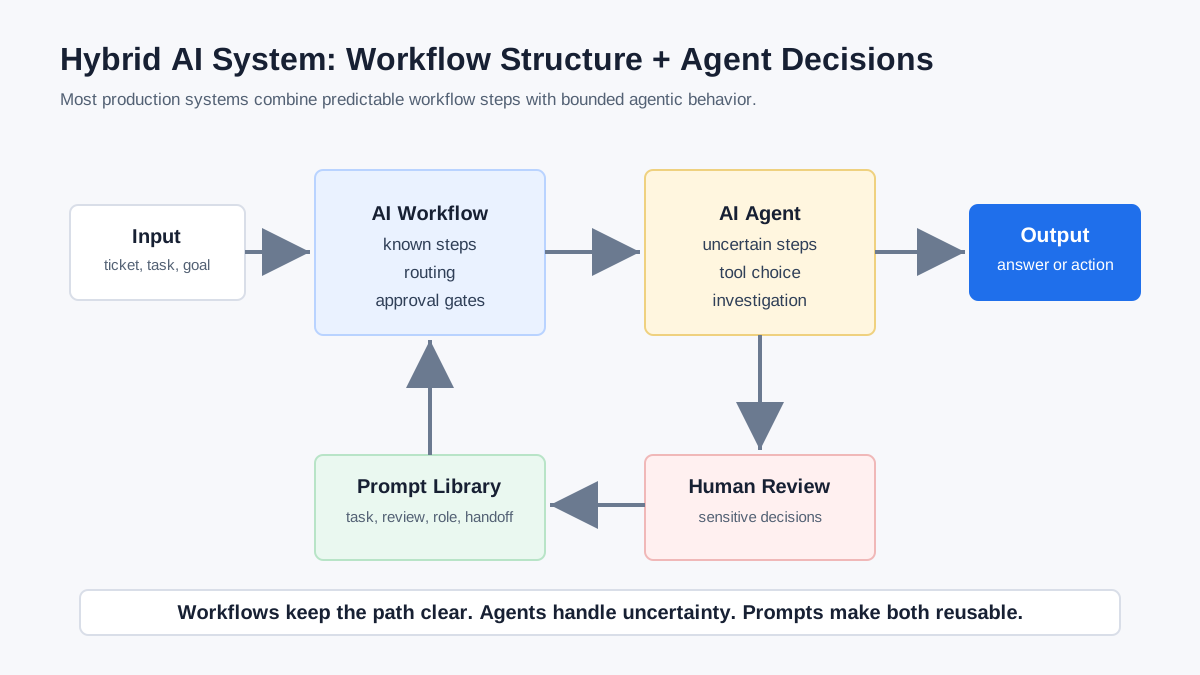
This hybrid approach avoids two common mistakes. It avoids overbuilding a fully autonomous agent for a predictable process. It also avoids forcing every unusual case through a rigid workflow.
Anthropic’s guidance on building effective agents makes a similar architectural distinction: workflows are structured systems where paths are predefined, while agents operate more dynamically. The OpenAI Agents SDK also supports both code-led and LLM-led orchestration patterns, which reflects how production systems often mix deterministic control with agentic behavior.
Is an Orchestrator Agent a Workflow?
An orchestrator agent is not exactly the same as a workflow, but it can manage a workflow. The orchestrator’s job is to coordinate agents, tools, handoffs, context, and workflow steps.
A workflow says, “Here is the process.”
An orchestrator agent says, “Given the goal and current state, what should happen next?”
In some systems, the orchestrator follows a mostly fixed workflow. In others, the orchestrator makes dynamic routing decisions. The more the orchestrator adapts based on context, the more agentic the system becomes.
This is why the line between agents and workflows can feel blurry. A workflow can contain agents. An agent can run inside a workflow. An orchestrator agent can coordinate both.
Why Prompts Matter in Both Agents and Workflows
Prompts matter in both agents and workflows because they define what the AI component should do, how it should behave, and what output it should produce.
In a workflow, prompts often define specific steps:
- Summarize this ticket.
- Extract these fields.
- Draft a response in this format.
- Review this output against these criteria.
In an agent, prompts often define broader behavior:
- What role the agent has
- What tools the agent may use
- When the agent should ask for clarification
- When the agent should hand off
- What risks require human review
- What output format is expected
This is where prompt management becomes important. As teams build more AI workflows and agents, prompts become reusable operating instructions. They should be stored, searched, improved, and versioned instead of scattered across chats and documents.
Decision Framework: Agent, Workflow, or Hybrid?
Use this framework to choose the right pattern.
| Question | Choose workflow if… | Choose agent if… |
|---|---|---|
| Are the steps known? | The sequence is clear | The path changes by context |
| Is the task repetitive? | It happens the same way often | Each case is different |
| Is risk high? | You need strict control | Use agent only inside guardrails |
| Does the system need tools? | Tool calls are predictable | Tool choice depends on the case |
| Is cost important? | You need predictable usage | Flexibility is worth variable cost |
| Is human approval needed? | Approval happens at fixed points | Approval depends on agent judgment |
| Are exceptions common? | Exceptions are rare | Exceptions are the main work |
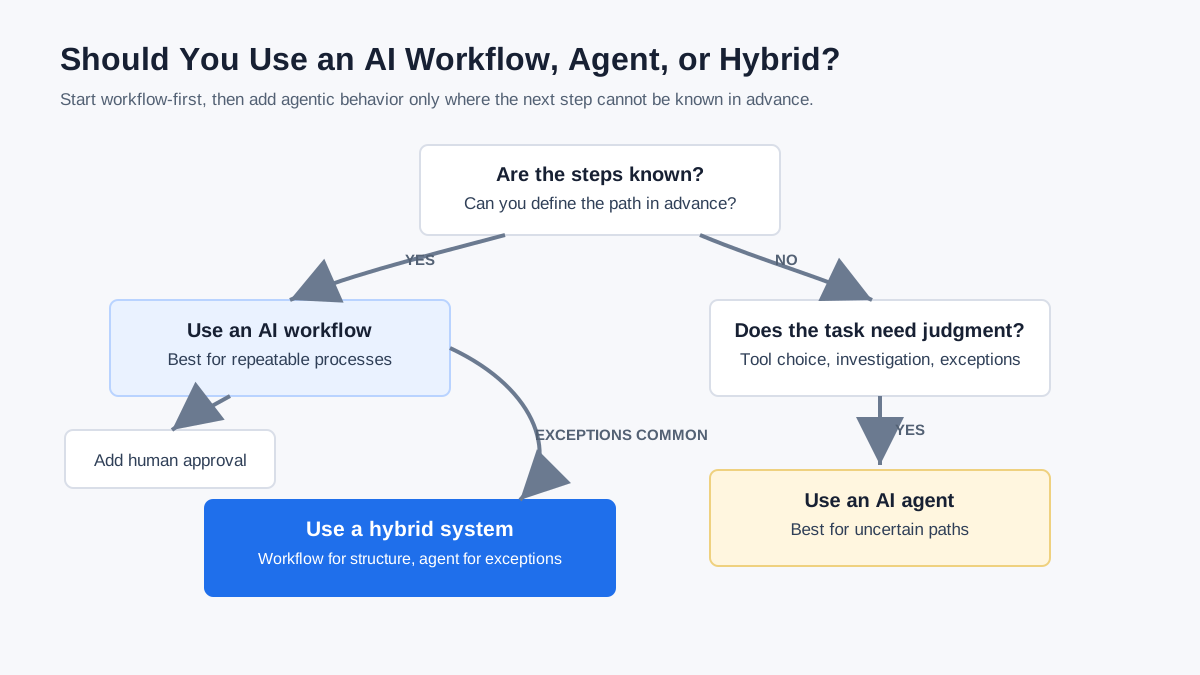
The safest default is often workflow-first. Start with a clear process, then add agentic behavior only where the workflow breaks because the next step cannot be known in advance.
Examples: Workflow vs Agent vs Hybrid
Content Production
A workflow can turn an approved brief into a draft, run an SEO checklist, and send the result to an editor. An agent can investigate a vague topic, decide what sources to inspect, identify missing angles, and suggest an outline. A hybrid system uses a workflow for the production pipeline and agents for research or review.
Customer Support
A workflow can classify tickets, summarize issues, and draft standard replies. An agent can investigate unusual cases, inspect customer history, and decide whether to escalate. A hybrid system uses workflows for routine tickets and agents for exceptions.
Sales Operations
A workflow can enrich leads, score them by rules, and draft outreach. An agent can analyze account context, detect unusual buying signals, and recommend the next best action. A hybrid system uses workflows for standard pipeline steps and agents for judgment-heavy account analysis.
Software Development
A workflow can run tests, summarize errors, and create a deployment checklist. An agent can inspect code, decide where a bug may be, make changes, and retry tests. A hybrid system keeps approvals and release steps deterministic while allowing agents to assist with investigation and repair.
Common Mistakes When Choosing Agents or Workflows
The most common mistake is calling every AI automation an agent. If the system follows fixed steps and the LLM only performs assigned tasks, it is probably an AI workflow, not a true agent.
Other common mistakes include:
- Using an agent when a simple workflow would be cheaper and easier to test
- Using a rigid workflow when exceptions are the real work
- Giving an agent too many tools without clear permissions
- Skipping human review for sensitive actions
- Treating prompts as disposable instead of reusable workflow instructions
- Not logging agent decisions or intermediate outputs
- Adding autonomy before defining success criteria
Good AI systems are not measured by how agentic they sound. They are measured by whether they complete useful work reliably, safely, and at a cost that makes sense.
How MaxPrompt Fits Into AI Agents and Workflows
MaxPrompt helps users organize, improve, search, reuse, and version prompts. That matters whether a team is building AI workflows, AI agents, or hybrid systems.
For workflows, MaxPrompt can store reusable prompts for each step:
- Classification prompts
- Summary prompts
- Drafting prompts
- Review prompts
- Approval prompts
For agents, MaxPrompt can store reusable prompts for behavior and coordination:
- Role prompts
- Tool-use prompts
- Handoff prompts
- Safety prompts
- Retry prompts
- Escalation prompts
As AI systems become more complex, prompt management becomes part of the workflow layer. A prompt is not just a clever instruction. It is a reusable asset that shapes how the system behaves.
The Bottom Line
The difference between an AI agent and an AI workflow is how much the system decides for itself. A workflow follows predefined steps. An agent can choose actions based on context. A hybrid system combines the predictability of workflows with the adaptability of agents.
Use workflows when you need structure, repeatability, and control. Use agents when the task requires judgment, tool choice, or adaptation. Use both when you need reliable execution with room for uncertainty.
Before adding more autonomy, make sure the basics are clear: the workflow, prompts, tools, guardrails, handoffs, and human review points. The best AI systems are usually not the most autonomous. They are the ones with the clearest structure around the right amount of autonomy.
FAQ
What is the difference between an AI agent and an AI workflow?
An AI workflow follows predefined steps, while an AI agent can decide what action to take next based on context, tools, and the user’s goal. Workflows are usually more predictable; agents are usually more adaptive.
Are AI agents better than workflows?
AI agents are not automatically better than workflows. Agents are better for uncertain or variable tasks. Workflows are better for repeatable processes that need control, testing, and predictable behavior.
When should I use an AI workflow?
Use an AI workflow when the steps are known, the process repeats often, the risk is high, or the output needs to be consistent. Workflows are a good fit for classification, summarization, routing, drafting, and approval processes.
When should I use an AI agent?
Use an AI agent when the task requires judgment, investigation, tool choice, or adaptation to new information. Agents are useful when the system cannot know every step in advance.
Can AI agents and workflows work together?
Yes. Many production AI systems combine agents and workflows. A workflow can provide the structure, while an agent handles uncertain steps, exceptions, tool selection, or investigation.
Is an orchestrator agent a workflow?
An orchestrator agent is not the same as a workflow, but it can coordinate workflow steps. An orchestrator agent manages agents, tools, handoffs, and context, while a workflow defines a process.
Stop losing your best prompts
One place to save, search and reuse every prompt you create — across all your AI tools. Free forever, no credit card.
- Smart search across 500+ prompts
- Sync across devices with Pro
- Ready-made templates to jump-start any task
- Stored locally — your data stays private

Written by
Daniel Torres
Machine learning practitioner and technical writer. Focuses on translating complex AI concepts into actionable guidance that non-technical teams can actually use.