The purpose of an orchestrator agent is to coordinate multiple AI agents, tools, data sources, and workflow steps so a complex task can be completed reliably. Instead of asking one general AI agent to do everything, an orchestrator agent breaks the goal into smaller tasks, chooses the right specialist for each step, passes context between agents, applies rules or guardrails, and assembles the final result.
In simple terms, an orchestrator agent is the coordination layer for agentic AI systems. It helps AI agents work as a system, not as isolated tools.
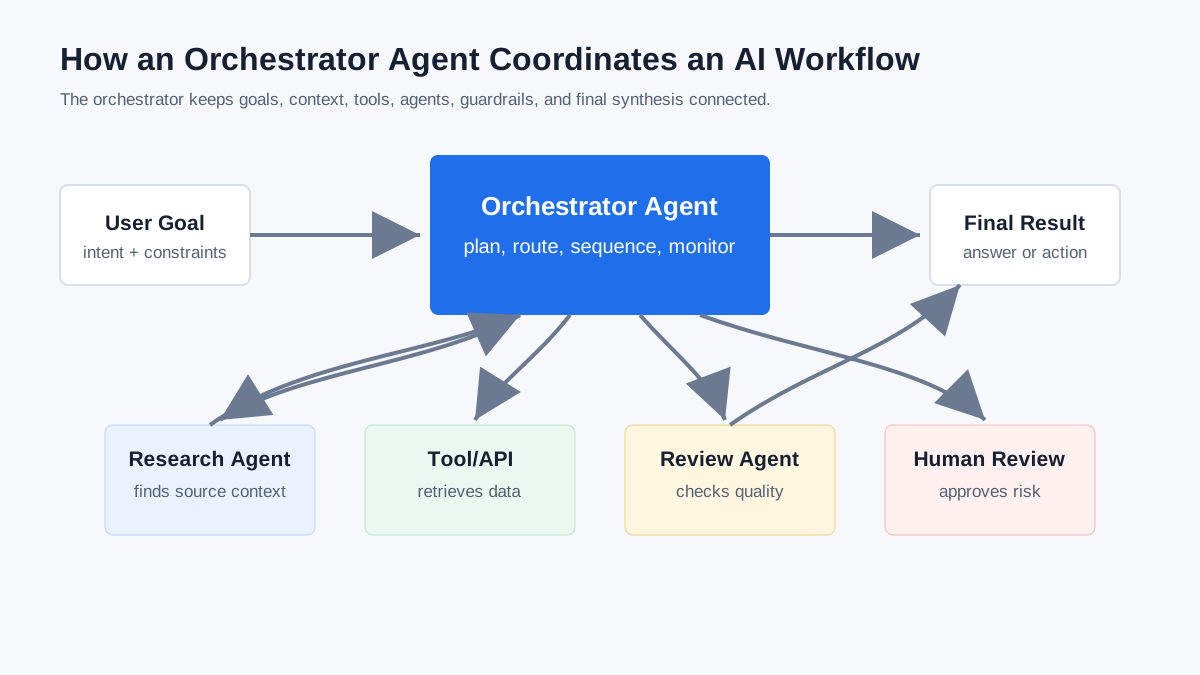
Quick Answer: What Does an Orchestrator Agent Do?
An orchestrator agent manages the flow of work in a multi-agent system. Its main jobs are to understand the user’s goal, split that goal into tasks, route each task to the right agent or tool, preserve shared context, monitor progress, handle errors, and decide when a human should review or approve an action.
This matters because real AI workflows rarely happen in one step. A customer support request might need authentication, account lookup, sentiment analysis, policy checking, response drafting, and escalation. A research workflow might need source discovery, summarization, fact-checking, synthesis, and formatting. An orchestrator agent keeps those steps connected.
IBM describes AI agent orchestration as the coordination of multiple specialized AI agents within a unified system. Salesforce frames it as structured management of how agents collaborate, access data, follow execution rules, and escalate when human oversight is needed.
Why Single AI Agents Are Not Always Enough
A single AI agent can be useful for bounded tasks, such as drafting an email, summarizing a document, querying a database, or calling one API. But complex work often requires several capabilities, each with different instructions, tools, permissions, and success criteria.
Without orchestration, agents can lose context, duplicate work, contradict one another, call tools in the wrong order, or take actions before a required check is complete. Orchestration gives the system structure. It defines who does what, when each step happens, what information carries forward, and what should happen if something goes wrong.
The harder question is not only “Can an agent do this task?” It is “Can a system of agents complete the whole workflow safely, consistently, and with enough context?”
The Core Purpose of an Orchestrator Agent
An orchestrator agent has six core purposes.
| Purpose | What it means |
|---|---|
| Task decomposition | Breaking a complex goal into smaller steps |
| Agent selection | Choosing the right specialist agent, tool, or workflow for each step |
| Sequencing | Deciding what happens first, next, in parallel, or after a condition is met |
| Context management | Preserving relevant history, user intent, intermediate outputs, and constraints |
| Quality control | Checking outputs, resolving conflicts, retrying failures, or escalating issues |
| Final synthesis | Combining agent outputs into one coherent result or completed action |
For example, imagine a content workflow where one agent researches a topic, another builds an outline, another writes a draft, another checks facts, and another prepares social posts. The orchestrator agent is not “better” than the specialists. Its value is coordination. It makes sure the right work happens in the right order with the right context.
How an Orchestrator Agent Works
An orchestrator agent usually follows a loop like this:
- It receives a goal from the user or system.
- It interprets the goal, constraints, and available context.
- It breaks the goal into smaller tasks.
- It chooses the agent, tool, API, or workflow for each task.
- It passes the right context to each step.
- It monitors intermediate results.
- It retries, reroutes, or escalates when needed.
- It combines the outputs into a final answer or action.
In production, orchestration is often partly AI-driven and partly code-driven. The AI layer may interpret intent, plan steps, or synthesize results. The code layer may enforce permissions, deterministic business rules, logging, retries, and approval gates.
The OpenAI Agents SDK documentation describes two broad orchestration approaches: allowing an LLM to decide what happens next, or defining the flow through code. Many real systems mix both.
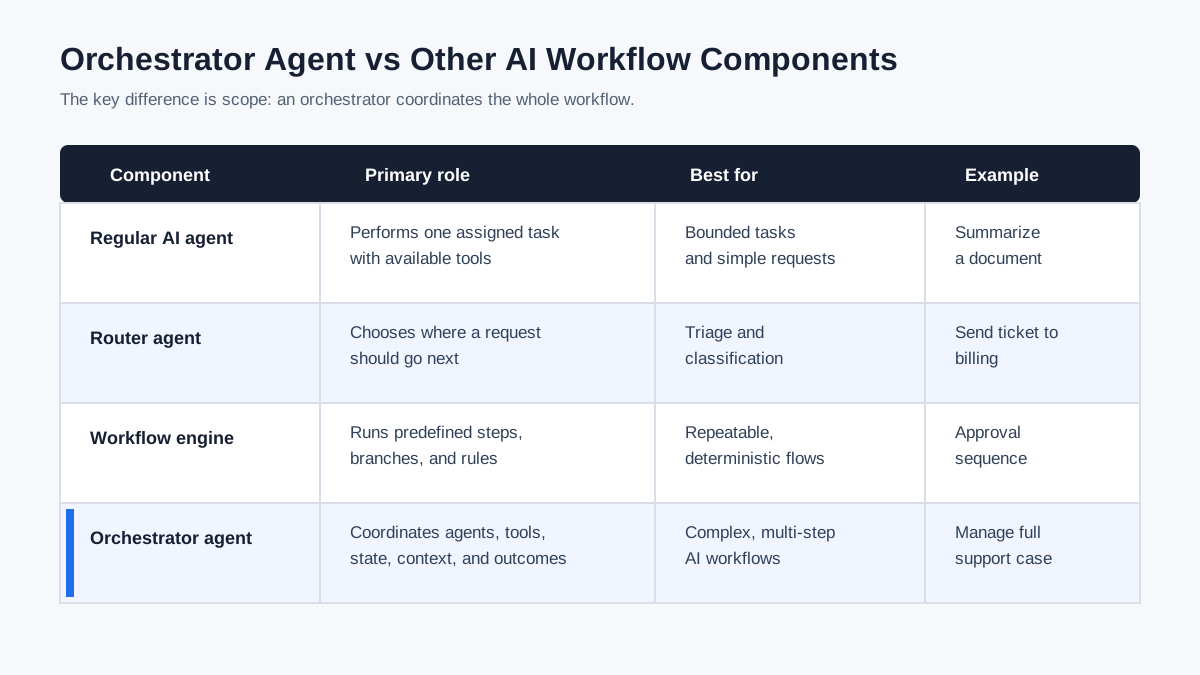
Orchestrator Agent vs Regular AI Agent
A regular AI agent is designed to perform a task. An orchestrator agent is designed to coordinate tasks.
| Type | Primary role | Example |
|---|---|---|
| Regular AI agent | Performs a specific job | A research agent finds sources |
| Specialist agent | Handles a narrow domain | A billing agent checks invoices |
| Router agent | Sends a request to the right destination | A triage agent routes support tickets |
| Workflow engine | Runs predefined steps | A system runs approval steps in order |
| Orchestrator agent | Coordinates agents, tools, state, rules, and outcomes | A supervisor agent manages a full support workflow |
The difference is scope. A specialist agent asks, “How do I complete my assigned task?” An orchestrator agent asks, “What needs to happen across the whole workflow to reach the goal?”
Orchestrator Agent vs Workflow Engine
An orchestrator agent and a workflow engine can overlap, but they are not identical.
A workflow engine usually follows predefined logic: step A, then step B, then step C, with clear branches and conditions. An orchestrator agent can work with that structure, but it may also make adaptive decisions based on context, intermediate results, uncertainty, or user intent.
In practice, production systems often combine both:
- Code handles deterministic rules, permissions, retries, and safety checks.
- The orchestrator agent handles interpretation, planning, routing, and synthesis.
- Specialist agents handle focused work.
- Humans approve sensitive actions.
This hybrid approach is often more reliable than giving an LLM full control over every decision.
How Orchestrator Agents Manage Handoffs
A handoff happens when one agent transfers work, control, or context to another agent. The orchestrator agent decides when that handoff should happen and what information the next agent should receive.
Good handoffs include:
- The original user goal
- The current task state
- Relevant conversation or workflow history
- Constraints, permissions, and policies
- Outputs from previous agents
- The next agent’s specific responsibility
- Criteria for success or escalation
Poor handoffs are one of the fastest ways for multi-agent systems to fail. If the next agent receives too much irrelevant context, it may drift. If it receives too little, it may repeat work or make the wrong decision.
The OpenAI Agents SDK handoffs documentation treats handoffs as delegation to another specialized agent. LangChain’s supervisor pattern uses a central supervisor agent to coordinate specialized sub-agents.
Common Orchestrator Agent Architectures
There are several common ways to design an orchestrator agent.
| Architecture | How it works | Best for |
|---|---|---|
| Centralized supervisor | One orchestrator controls routing and decisions | Enterprise workflows, compliance-heavy systems |
| Tool-calling specialists | The orchestrator calls specialist agents like tools | Bounded subtasks and clean output synthesis |
| Handoff-based system | One agent transfers control to another | Customer support, triage, domain-specific conversations |
| Sequential workflow | Agents run in a fixed order | Repeatable processes like content pipelines |
| Parallel workflow | Multiple agents work at once, then results are merged | Research, analysis, evaluation, comparison |
| Hybrid orchestration | Code and LLM decisions work together | Production systems that need reliability and flexibility |
The right architecture depends on risk, complexity, tool access, cost, and how much autonomy the system should have.
Real-World Examples of Orchestrator Agents
Customer Support
A support orchestrator agent can receive a customer request, identify intent, verify account status, route billing questions to a billing agent, route technical issues to a troubleshooting agent, and escalate sensitive cases to a human. The orchestrator keeps the conversation state intact so the customer does not have to restart at every step.
Sales Operations
A sales orchestrator agent can monitor account activity, ask an analytics agent to detect buying signals, ask a CRM agent to update records, ask a drafting agent to prepare outreach, and pause the workflow if a compliance check fails.
AI Research
A research orchestrator agent can split a topic into subquestions, assign source discovery to one agent, ask another agent to summarize findings, use a fact-checking agent to verify claims, and synthesize the final brief.
Content Production
A content orchestrator agent can coordinate keyword research, outline creation, drafting, editing, fact-checking, internal linking, and social repurposing. This is where prompt management becomes especially important because each step needs reusable instructions and quality rules.
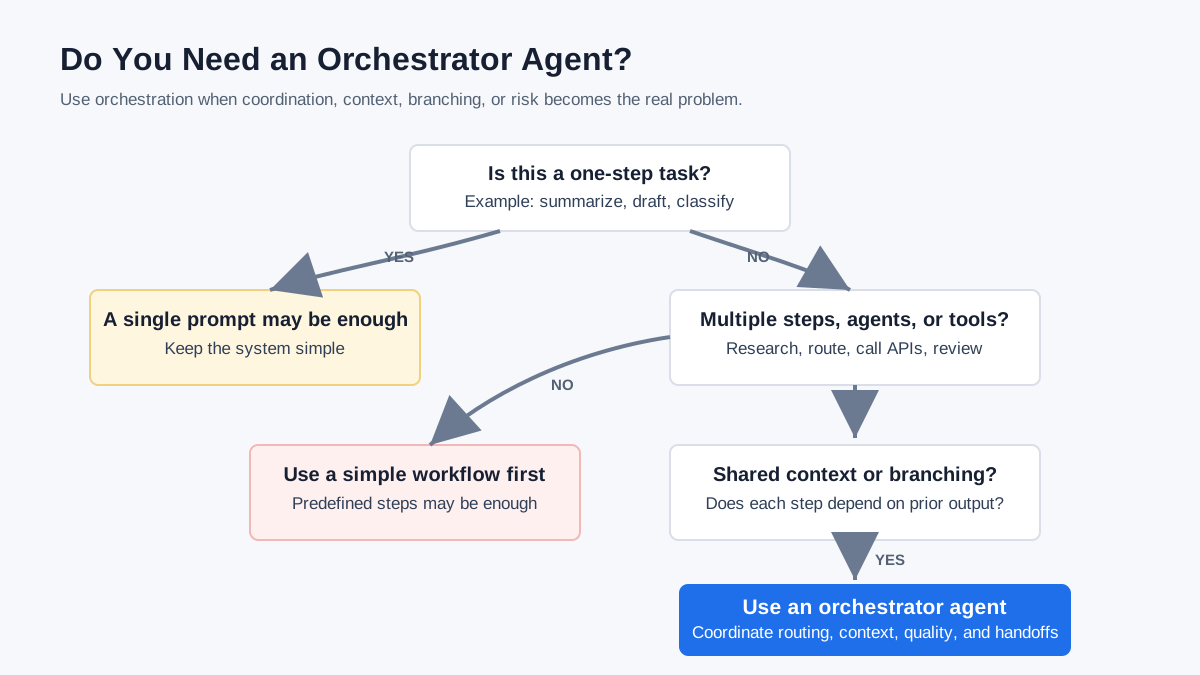
When Do You Actually Need an Orchestrator Agent?
You probably need an orchestrator agent when a workflow has multiple steps, multiple tools, multiple specialist roles, or meaningful risk.
| Question | If yes, orchestration may help |
|---|---|
| Does the task require more than one specialized capability? | Use an orchestrator |
| Does the workflow need shared context across steps? | Use an orchestrator |
| Can the task branch depending on intermediate results? | Use an orchestrator |
| Are there sensitive actions that require approval? | Use an orchestrator with human-in-the-loop |
| Do you need logs, traceability, or quality checks? | Use an orchestrator |
| Is the task a simple one-step prompt? | A single agent or prompt may be enough |
Not every AI task needs orchestration. If a single prompt gives consistent results, adding multiple agents may create unnecessary complexity. Orchestration becomes valuable when coordination is the bottleneck.
Risks and Guardrails for Orchestrator Agents
Orchestrator agents can make AI systems more powerful, but they also introduce new risks.
The main risks are:
- Agents calling each other in loops
- Conflicting outputs from different agents
- Context loss between steps
- Unclear authority over tools or data
- High token and API costs
- Weak auditability
- Sensitive actions happening without approval
- Prompt injection or untrusted external content influencing the workflow
Strong orchestrator systems need clear permissions, tool boundaries, logs, evaluation steps, human approval for sensitive actions, and failure handling. The orchestrator should know not only what to do next, but also when to stop, ask for review, or refuse an unsafe action.
Protocols and standards are evolving around this problem. Google’s Agent2Agent protocol focuses on agent communication, capability discovery, task management, and state updates. Anthropic’s Model Context Protocol focuses on connecting AI systems to tools and data sources. These are related pieces of the broader orchestration puzzle.
How Prompt Management Helps Orchestrator Agents Work Better
Orchestrator agents are only as good as the instructions, roles, context, and constraints they can rely on. In many teams, those instructions live in scattered documents, chat histories, Notion pages, or half-remembered prompt snippets. That makes agent workflows hard to reproduce.
Prompt management helps by turning agent instructions into reusable assets:
- Role prompts for specialist agents
- Handoff prompts between agents
- Review prompts for quality checks
- Safety prompts for tool use and approvals
- Workflow templates for repeatable tasks
- Version history for improving prompts over time
This is where MaxPrompt fits naturally. MaxPrompt helps users organize, improve, search, reuse, and version prompts, which becomes more important as simple prompts evolve into multi-step AI workflows.
For example, a content team could keep reusable prompts for research, outlining, drafting, fact-checking, SEO review, and social repurposing. In an orchestrated workflow, those prompts become more than text commands. They become operating instructions for how each agent or step should behave.
The Bottom Line
The purpose of an orchestrator agent is to make multi-agent AI systems coordinated, reliable, and easier to manage. It turns separate agents into a working system by managing task decomposition, routing, sequencing, context, handoffs, guardrails, and final synthesis.
A single AI agent can complete a task. An orchestrator agent helps complete a workflow.
For simple requests, one well-written prompt may be enough. For complex workflows involving multiple tools, roles, decisions, and approvals, the orchestrator agent becomes the control layer that keeps the whole system moving toward the right outcome.
FAQ
What is an orchestrator agent?
An orchestrator agent is an AI agent or coordination layer that manages how other agents, tools, and workflow steps work together to complete a complex goal.
What is the main purpose of an orchestrator agent?
The main purpose of an orchestrator agent is to coordinate work across multiple agents by breaking down tasks, routing work, preserving context, managing handoffs, and producing a unified result.
Is an orchestrator agent the same as a supervisor agent?
They are closely related. A supervisor agent is usually a centralized orchestrator that coordinates specialist agents. “Orchestrator agent” is the broader term because orchestration can also include workflows, tools, policies, memory, and human approval steps.
Do all AI workflows need an orchestrator agent?
No. Simple one-step tasks often work better with a single prompt, single agent, or deterministic workflow. Orchestrator agents are most useful when a task involves multiple steps, agents, tools, decisions, or risks.
What is the difference between an orchestrator agent and a router agent?
A router agent mainly chooses where a request should go. An orchestrator agent can route tasks, but it also manages sequencing, shared context, quality checks, retries, policies, handoffs, and final synthesis.
How does prompt management support orchestrator agents?
Prompt management helps teams store, improve, reuse, and version the instructions that define agent roles, handoffs, safety rules, and workflow steps. This makes orchestrated AI workflows easier to maintain and improve.
Stop losing your best prompts
One place to save, search and reuse every prompt you create — across all your AI tools. Free forever, no credit card.
- Smart search across 500+ prompts
- Sync across devices with Pro
- Ready-made templates to jump-start any task
- Stored locally — your data stays private

Written by
Daniel Torres
Machine learning practitioner and technical writer. Focuses on translating complex AI concepts into actionable guidance that non-technical teams can actually use.