Prompt management for AI agents is the practice of organizing, reusing, improving, and versioning the instructions that guide agent behavior. As AI use moves from one-off chats to repeatable workflows, prompts stop being disposable text snippets. They become operating instructions for agents, tools, handoffs, reviews, and approvals.
This matters because AI agents do not only need good models. They need clear roles, stable context, reliable handoffs, and repeatable quality checks. A prompt library gives teams a shared place to store those instructions, improve them over time, and reuse them across workflows.
In simple terms: prompt engineering helps you write a better instruction. Prompt management helps you run better AI workflows with those instructions.
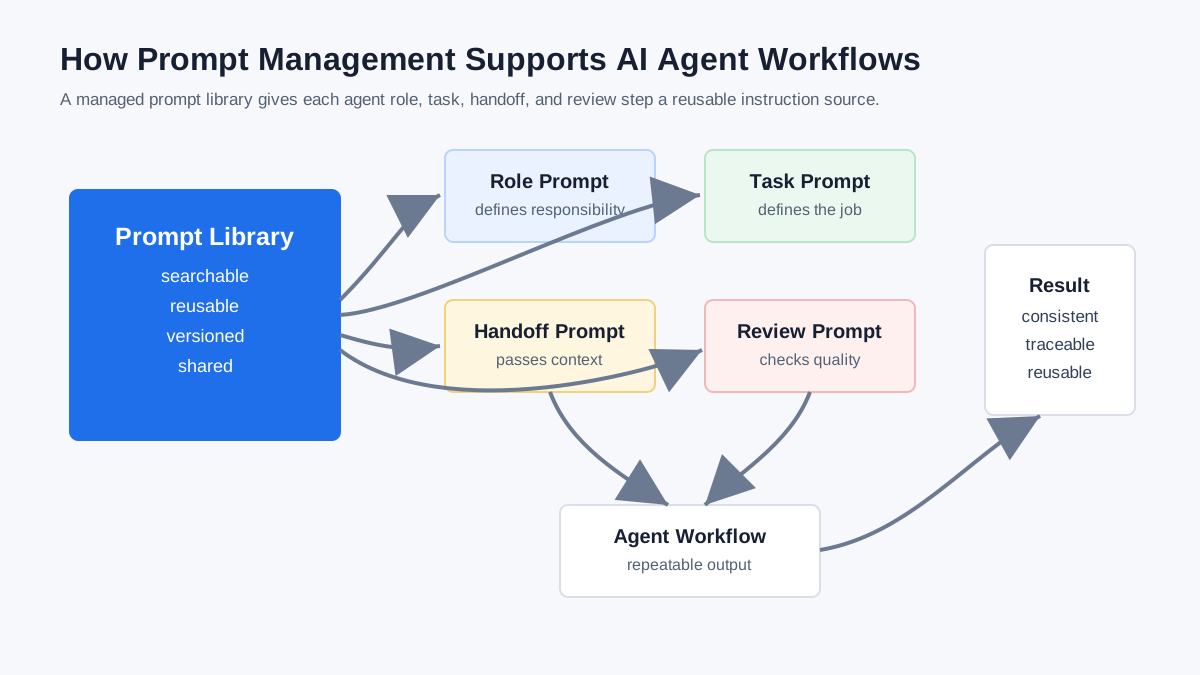
Quick Answer: What Is Prompt Management for AI Agents?
Prompt management for AI agents means treating agent instructions as reusable workflow assets. It includes storing prompts in a searchable library, naming them clearly, grouping them by use case, tracking changes, saving better versions, and reusing them across agents or workflow steps.
For an AI agent workflow, prompt management can include:
- Role prompts that define what each agent is responsible for
- Task prompts that define the work to complete
- Handoff prompts that define what context moves between agents
- Review prompts that check output quality
- Safety prompts that limit risky behavior
- Escalation prompts that tell the system when to involve a human
- Version history that shows how prompts changed over time
The goal is not to make prompts more complicated. The goal is to make agent behavior easier to reproduce, debug, improve, and share.
Why One-Off Prompts Break Down in Agent Workflows
One-off prompts work well when a person is experimenting in a chat window. They break down when a team needs the same agent behavior to run consistently across people, tools, and workflows.
The problem is not only that prompts get lost. The bigger problem is that important operating knowledge becomes scattered. One person keeps a good research prompt in a private chat. Another keeps a support prompt in a document. A third edits the wording without recording what changed. When the output gets worse, nobody knows which instruction caused the change.
In an agent workflow, that inconsistency compounds. A research agent may pass a vague brief to a writer agent. The writer agent may draft from incomplete context. A review agent may check against a different quality standard. By the end of the chain, the team is debugging a workflow without a stable record of the instructions that shaped it.
Prompt management reduces that drift by giving each agent and each workflow step a clear, reusable source of truth.
Prompt Engineering vs Prompt Management
Prompt engineering and prompt management are related, but they solve different problems.
| Concept | What it improves | Main question |
|---|---|---|
| Prompt engineering | The quality of one instruction | “How do we write this prompt better?” |
| Prompt management | The lifecycle of many prompts | “How do we store, reuse, update, and govern prompts over time?” |
| Prompt library | Discovery and reuse | “Where is the right prompt for this task?” |
| Prompt versioning | Change tracking | “Which prompt version produced this behavior?” |
| Prompt workflow | Repeatability | “How do these prompts work together across steps?” |
Prompt engineering is usually focused on wording, examples, constraints, and output format. Prompt management is focused on organization, access, versioning, collaboration, and reuse.
AI agents need both. A well-written prompt helps an agent perform one task. A managed prompt system helps teams run that task repeatedly without rediscovering or rewriting instructions from scratch.
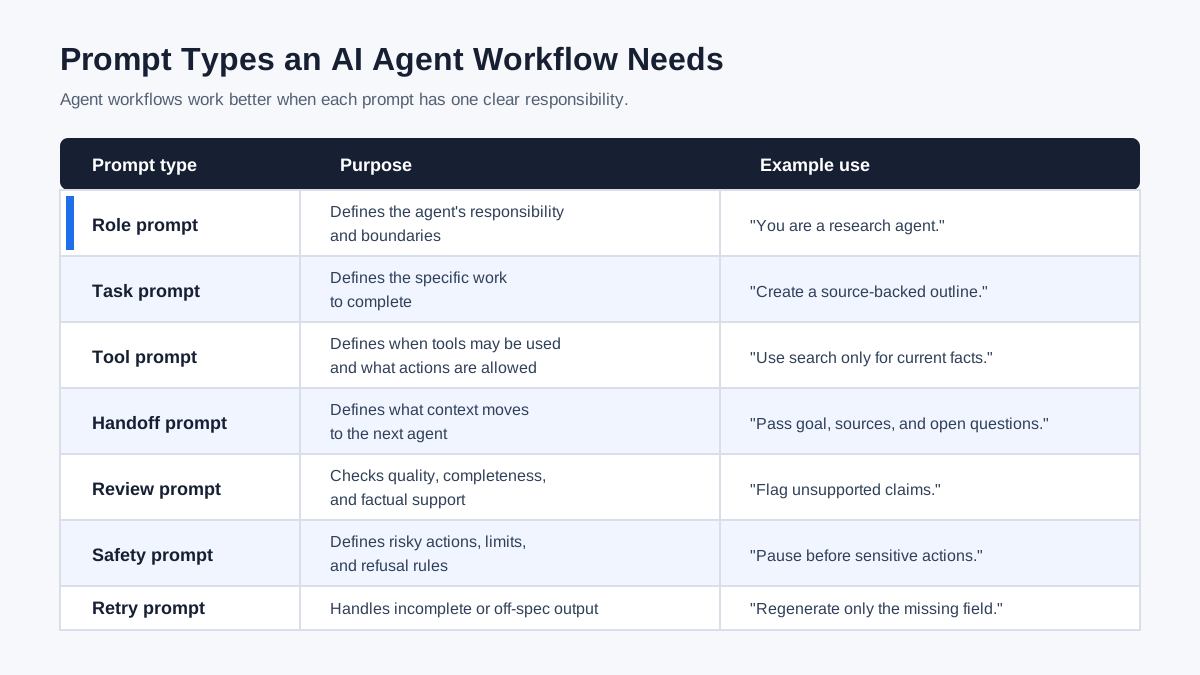
The Types of Prompts an AI Agent Workflow Needs
AI agent workflows usually need more than one kind of prompt. A single system prompt is rarely enough once the workflow includes multiple roles, tools, reviews, or handoffs.
| Prompt type | Purpose | Example use |
|---|---|---|
| Role prompt | Defines the agent’s identity and responsibility | “You are a research agent that gathers credible sources.” |
| Task prompt | Defines the specific job to complete | “Create a source-backed outline for this topic.” |
| Tool prompt | Defines how and when tools may be used | “Use search only for current facts or source verification.” |
| Handoff prompt | Defines what to pass to another agent | “Summarize the goal, constraints, sources, and unresolved questions.” |
| Review prompt | Defines quality checks | “Flag unsupported claims, weak structure, and missing examples.” |
| Safety prompt | Defines boundaries and refusal rules | “Do not execute sensitive actions without human approval.” |
| Escalation prompt | Defines when to pause | “Ask for review if confidence is low or policy risk is high.” |
| Retry prompt | Defines failure handling | “If the output is incomplete, identify the missing field and regenerate only that section.” |
This taxonomy helps teams design agent workflows more deliberately. Instead of asking one long prompt to do everything, each prompt has a clear job.
Why Prompt Management Matters More in Multi-Agent Systems
Prompt management becomes more important as the number of agents increases. Each new agent adds another role, another instruction set, another possible handoff, and another place where context can be lost.
Multi-agent frameworks already reflect this reality. The OpenAI Agents SDK describes agents that can use tools, hand off to specialized agents, use guardrails, and produce traces of what happened during a run. LangChain’s supervisor pattern describes coordination where one agent can direct or transfer control to other agents.
Those framework features are powerful, but they do not remove the need for clear instructions. The system still needs to know:
- What each agent is responsible for
- When an agent should use a tool
- When an agent should hand off to another agent
- What context should be passed forward
- What output format the next step expects
- What quality standard should be applied
- When a human should review the result
Prompt management gives teams a practical way to maintain those instructions outside of a single chat session or buried code comment. It is also a natural companion to orchestrator agents, which coordinate those instructions across an entire workflow.
How Prompt Libraries Support AI Agent Workflows
A prompt library is a shared collection of reusable prompts. For AI agents, a prompt library works like an instruction inventory: it stores the role prompts, task prompts, handoff prompts, and review prompts that make workflows repeatable.
A useful agent prompt library should make prompts easy to:
- Find by task, role, workflow, or tool
- Reuse across similar workflows
- Update without losing the previous version
- Compare when performance changes
- Share with teammates
- Group into workflow templates
- Connect to examples, constraints, and output formats
For example, a content team might store one prompt for SEO research, one for outline creation, one for drafting, one for fact-checking, one for internal linking, and one for social repurposing. A support team might store prompts for triage, account lookup, policy review, reply drafting, and escalation.
The library does not replace the agent. It gives the agent system a more stable instruction layer.
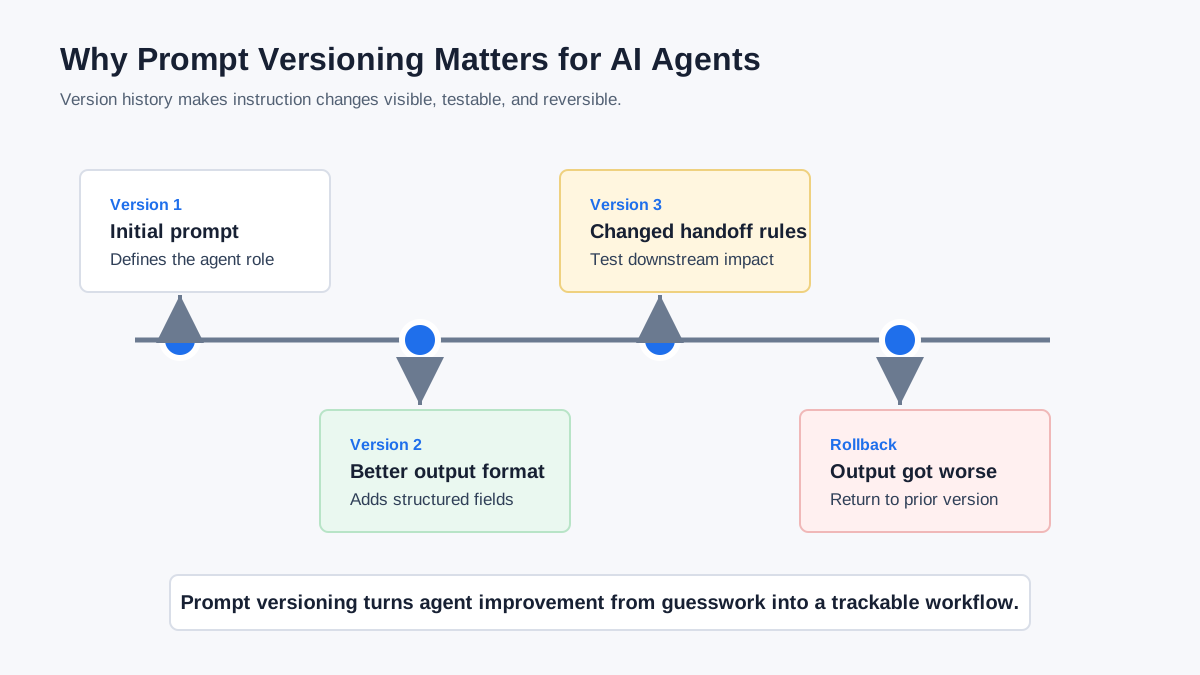
How Prompt Versioning Helps AI Agents Improve
Prompt versioning helps teams track how changes to instructions affect agent behavior. Without version history, teams often improve prompts by trial and memory. That works during experimentation, but it becomes risky in repeatable workflows.
Versioning answers practical questions:
- What changed in this prompt?
- Who changed it?
- Why was it changed?
- Which version worked better?
- Can we roll back to a previous version?
- Did the output change after the instruction changed?
This is especially important for agent workflows because small prompt changes can affect downstream behavior. If a research prompt stops including caveats, the writer prompt may produce overconfident claims. If a handoff prompt stops passing source URLs, the review step may become weaker. If a safety prompt becomes too vague, the agent may take actions that should have required approval.
Prompt versioning does not guarantee better results, but it makes improvement observable. It gives teams a way to learn from prompt changes instead of guessing.
Prompt Management and Agent Handoffs
Agent handoffs are one of the clearest reasons to manage prompts carefully. A handoff happens when one agent transfers work, context, or control to another agent or to a human reviewer.
The OpenAI Agents SDK treats handoffs as delegation to specialized agents. LangChain documentation describes handoffs as a pattern for multi-stage flows and agent transitions. In both cases, the quality of the handoff depends on what gets passed forward.
A reusable handoff prompt should define:
- The original goal
- The current workflow state
- The sender agent’s completed work
- Important evidence or source links
- Known constraints
- Open questions
- The receiving agent’s responsibility
- The expected output format
- Failure or escalation rules
Without a handoff prompt, teams often pass raw agent output to the next step and hope the receiving agent understands what matters. That is fragile. A handoff prompt turns the transfer into a repeatable contract.
Prompt Management, Guardrails, and Human Review
Prompt management also supports guardrails and human review. Guardrails are checks that help keep agent behavior within acceptable boundaries. Human review is the process of pausing for a person when the workflow involves uncertainty, risk, or sensitive action.
OpenAI’s Agents SDK guardrails documentation separates agents, handoffs, tools, guardrails, and tracing as core parts of agentic applications. That separation is useful because it shows that an agent workflow is not just a model response. It is a system with instructions, tool access, checks, and records of what happened.
Prompts can help define those boundaries:
- A safety prompt can tell an agent what it must not do.
- A tool-use prompt can define when an external tool is allowed.
- A review prompt can check whether output meets standards.
- An escalation prompt can tell the agent when to ask a human.
- A logging or summary prompt can make the workflow easier to inspect.
These prompts should be stored and maintained deliberately. If safety and review instructions are scattered or improvised, the workflow becomes harder to trust.
What to Store in an AI Agent Prompt Library
An AI agent prompt library should store more than the prompt text. The metadata around the prompt is often what makes it usable.
For each prompt, store:
| Field | Why it matters |
|---|---|
| Prompt name | Makes the prompt easy to identify |
| Agent role | Shows which agent or workflow step uses it |
| Use case | Explains when to use it |
| Inputs | Defines what information the prompt expects |
| Output format | Helps the next step parse or reuse the result |
| Constraints | Defines boundaries, rules, or policy requirements |
| Tools allowed | Clarifies what the agent may access |
| Handoff rules | Explains what to pass forward |
| Review criteria | Defines what good output looks like |
| Version notes | Records what changed and why |
| Examples | Shows the prompt in action |
This structure makes prompts easier to reuse and safer to adapt. It also helps new teammates understand why a prompt exists, not just what it says.
Example: A Managed Prompt Workflow for Content Production
Here is a simple example of how prompt management can support a multi-agent content workflow.
| Workflow step | Agent | Managed prompt |
|---|---|---|
| Topic research | Research agent | Finds sources, extracts entities, flags uncertainty |
| SEO brief | SEO agent | Builds intent map, semantic map, and outline |
| Drafting | Writer agent | Writes the article from the approved outline |
| Fact-checking | Review agent | Checks claims, sources, dates, and unsupported statements |
| Internal linking | SEO agent | Suggests related pages and anchor text |
| Social repurposing | Social agent | Turns article points into LinkedIn or X posts |
| Human approval | Editor | Reviews risky claims and final positioning |
Each step can have a reusable prompt with its own role, inputs, output format, and review criteria. If the research prompt improves, the team can update and version that prompt without rewriting the entire workflow. If the review prompt catches more unsupported claims, the team can reuse it across every article.
This is the practical value of prompt management: it turns scattered AI instructions into a reusable workflow system.
How MaxPrompt Helps Manage AI Agent Prompts
MaxPrompt is built for organizing, improving, searching, reusing, and versioning prompts. That makes it useful when simple prompt collections start becoming agent workflows.
For AI agent work, MaxPrompt can help teams keep track of:
- Role prompts for specialist agents
- Reusable task prompts
- Handoff prompts between workflow steps
- Review prompts for quality control
- Prompt categories and tags
- Prompt improvements and saved versions
- Prompt backups and reuse across apps
This does not mean every MaxPrompt user needs a complex multi-agent system. It means the same discipline that helps individual prompts stay organized becomes even more valuable when prompts start powering repeatable workflows.
If your team is already copying prompts between chats, documents, browser tabs, and AI tools, prompt management is the first layer to fix. Agent orchestration becomes much easier when the underlying instructions are findable, reusable, and versioned.
When You Do Not Need Prompt Management Yet
Not every AI user needs a full prompt management workflow on day one. If you use AI for occasional one-off questions, a simple note or saved chat may be enough.
Prompt management becomes worth it when:
- You reuse the same prompts often
- Multiple people need the same instructions
- Prompts support recurring workflows
- Agent outputs need consistent quality
- You need to track prompt changes
- You use different prompts for different agent roles
- You have handoffs between workflow steps
- You need review or approval prompts
The decision point is repeatability. Once a prompt becomes part of how work gets done, it should be managed like a work asset.
Best Practices for Managing AI Agent Prompts
Use these practices to keep agent prompts reliable:
- Name prompts by role and task, not vague labels.
- Store expected inputs and outputs with each prompt.
- Keep role prompts separate from task prompts.
- Use handoff prompts whenever one agent passes work to another.
- Add review prompts for important outputs.
- Version prompts when you change instructions.
- Keep examples with high-value prompts.
- Remove prompts that are outdated or duplicated.
- Add safety and escalation rules for risky workflows.
- Review agent prompts every few months as tools and frameworks change.
The best prompt libraries are not huge piles of clever snippets. They are organized systems of reusable instructions that make work easier to repeat.
The Bottom Line
Prompt management for AI agents is about making agent instructions reusable, traceable, and easier to improve. As AI workflows become more complex, prompts become part of the system architecture. They define roles, tasks, handoffs, reviews, tool use, and escalation rules.
A single prompt can help with one task. A managed prompt library can support an entire workflow.
For teams building or experimenting with AI agents, prompt management is a practical first step. Before adding more autonomy, more tools, or more agents, make sure the instructions behind the system are clear, findable, reusable, and versioned.
FAQ
What is prompt management for AI agents?
Prompt management for AI agents is the process of storing, organizing, reusing, improving, and versioning the prompts that define agent roles, tasks, handoffs, safety rules, and review criteria.
Why do AI agents need prompt management?
AI agents need prompt management because agent workflows depend on consistent instructions. Without managed prompts, teams can lose track of roles, handoff rules, output formats, review standards, and prompt changes.
What is the difference between prompt engineering and prompt management?
Prompt engineering improves the wording and structure of a prompt. Prompt management handles the lifecycle of prompts, including storage, search, reuse, collaboration, versioning, and governance.
What prompts should an AI agent workflow store?
An AI agent workflow should store role prompts, task prompts, tool-use prompts, handoff prompts, review prompts, safety prompts, escalation prompts, and retry prompts. Each prompt should include inputs, constraints, output format, and version notes.
How does prompt versioning help AI agents?
Prompt versioning helps teams track which instruction changes affected agent behavior. It makes it easier to compare versions, roll back bad changes, and improve prompts based on actual workflow results.
Can prompt management improve agent handoffs?
Yes. Prompt management improves agent handoffs by making context-transfer instructions reusable. A managed handoff prompt can define what context to pass, what the receiving agent should do, and when the workflow should escalate.
Stop losing your best prompts
One place to save, search and reuse every prompt you create — across all your AI tools. Free forever, no credit card.
- Smart search across 500+ prompts
- Sync across devices with Pro
- Ready-made templates to jump-start any task
- Stored locally — your data stays private

Written by
Sarah Chen
AI productivity researcher and prompt engineering advocate. Writes about building repeatable AI workflows and has consulted with teams scaling content operations with large language models.